


Perplexity - Ask Anything
4.614.60K Reviews
App Specs
- Version
- 2.97.0
- Updated On
- License
- Free
- Downloads
- 100,000,000+
- Developer
- PerplexityAI
- Categories
- Productivity
- Platform
- Android, iOS
Screenshots

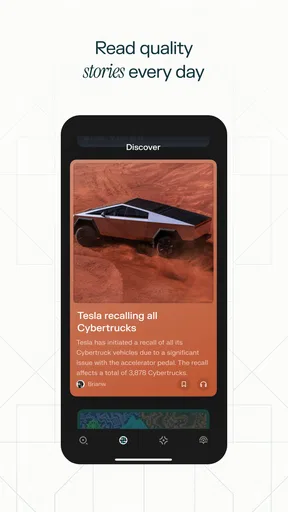
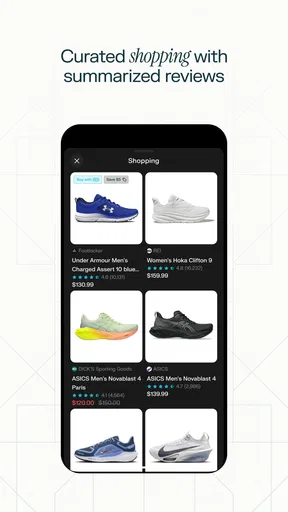
 Analysis by AppCompare
I use question-and-answer apps most when I have a small uncertainty that interrupts whatever I am doing: a term I have forgotten, a cooking step I want to check, or a subject I need to understand before reading more deeply. Perplexity - Ask Anything is built for that kind of moment. It turns a question into a conversational starting point, which can feel more direct than opening a search page and deciding which result to trust first.
That convenience is the main reason I would try it, but it is not a reason to treat every answer as settled fact. The app is a productivity tool from PerplexityAI, and its usefulness depends on the question, the quality of the response, and whether I take the time to check important claims. I find it most valuable as a way to get oriented and decide what to investigate next, rather than as a replacement for careful research.
What the free option means in practice
The app is free to install, which makes it easy to test on ordinary questions before deciding whether it belongs in your routine. It also offers in-app purchases, with listed prices ranging from $4.99 to $1,999.99 per item. That wide range is a reason to check the purchase details in the app before paying; it does not, by itself, tell me which paid option would suit a particular person or what value they would get from it.
For me, the sensible approach is to begin with the free access and judge the experience against my actual needs. If I only want occasional explanations or quick help forming a better search, paying may not be necessary. If I expect to use an AI assistant frequently, I would compare the available purchase terms with the tasks I regularly do rather than assuming a paid option automatically makes the answers more useful.
How it earns a place in a productivity routine
The time-saving benefit is not simply that an answer appears quickly. It is that I can ask a follow-up in the same conversation when the first response leaves out a distinction I need. For example, if I am learning an unfamiliar topic, I can ask for a plain-language explanation, then ask what a key term means, and then request a practical example. That sequence helps me move from a vague question toward something I can use, without having to rebuild the context in a new search each time.
A useful habit is to include the purpose and constraints in the first question. Instead of asking for general meal advice, I might specify that I need a simple explanation of how to avoid overcooking eggs. For a work or study question, I can say whether I need a quick overview, a comparison, or a list of points to verify. Better framing does not guarantee a correct response, but it gives the assistant a clearer target and often makes the result easier to assess.
I would also treat the answer as a draft when the outcome matters. A summary can help me identify the right vocabulary or the next question to ask, while the linked reading mentioned in the original experience can offer a route into more detail. Before using information in a school assignment, a professional decision, or anything involving health or money, I would check the underlying material and make sure it supports the conclusion. The convenience is real; so is the responsibility to verify.
Worth Reading Before You Choose

Flipboard Shows What News Apps Must Do Beyond the Feed

Switching to Android Auto Means Rethinking Your Driving Routine

Google Calendar Makes a Crowded Week Easier to Manage

Ludo King Makes the Most of the Minutes Between Plans

Baby Panda World Brings Quick Play to Modern Phones, but Its Game Library Feels Busy

ESPN’s Live Game View Makes Following Close Games Easier
What Exactly is Perplexity - Ask Anything?
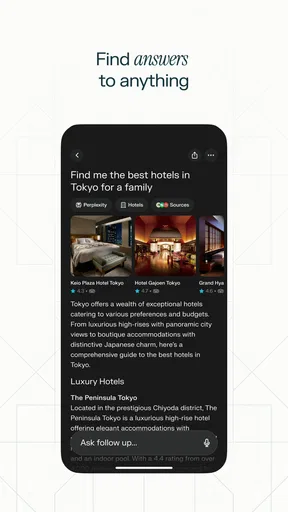
You know those moments when you just need an answer without the hassle of sifting through endless search results? That’s where Perplexity - Ask Anything steps in. The app positions itself as a sort of virtual assistant, ready to tackle any query you throw at it. From trivia and tech advice to life hacks and random musings, it’s got you covered.
Getting Started with the App
Jumping into Perplexity - Ask Anything is as easy as pie. The interface is sleek and intuitive, which is a relief for those of us who don’t want to spend ages figuring out how to navigate an app. Once you open it, you’re greeted with a simple prompt to type in your question. No unnecessary bells and whistles, just straight to the point.
One thing I noticed right off the bat is how the app doesn’t bombard you with ads or distractions. This minimalist design choice really enhances the user experience, allowing you to focus on what really matters: getting your questions answered.
The Brain Behind the Operation
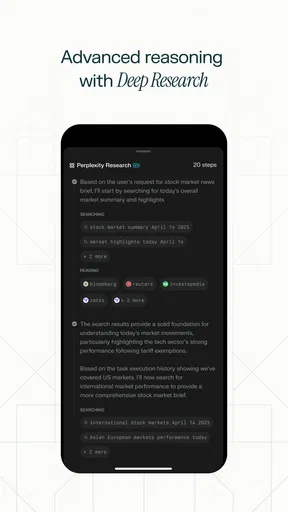
Now, you might be wondering, how does this app come up with answers so quickly? It leverages a powerful AI engine that scours the web for relevant information. Pretty cool, right? The responses are usually concise and to the point, which is perfect when you just need a quick answer.
However, while the AI is impressive, it’s not infallible. Occasionally, it might miss the mark or interpret questions in unexpected ways. But hey, no one’s perfect, right? It’s all about learning to phrase your queries in a way that gets the best results.
Features Worth Mentioning
One standout feature is the app’s ability to handle follow-up questions seamlessly. If you need more info or clarification, just keep asking. It’s like having a conversation with a knowledgeable friend who never tires of your curiosity.
Another neat aspect is the personalization feature. Over time, the app learns your preferences and tailors its responses accordingly. It’s a subtle touch, but it certainly makes the experience feel more customized and engaging.
Putting Perplexity to the Test
So, naturally, I put this baby through its paces with a barrage of questions, ranging from "What’s the weather in Tokyo tomorrow?" to "How do you make the perfect scrambled eggs?" The results were surprisingly accurate and helpful. It even cracked a joke or two, which was a pleasant surprise!
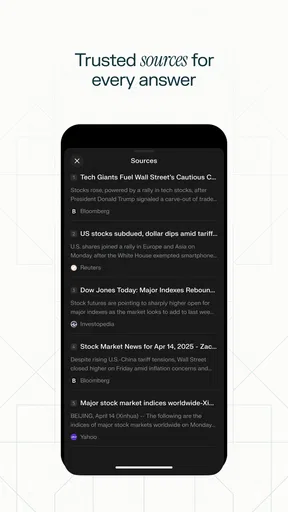
For more complex queries, the app provides links to detailed articles and resources, which is a fantastic way to delve deeper into a topic without leaving the app. It’s like having a library at your fingertips, minus the late fees.
Choosing the right tool for the job
Compared with a traditional search engine, a conversational answer can be quicker to scan when I need an overview rather than a page of competing links. The trade-off is that a search results page makes it easier to see several sources side by side and choose which to open. I use the assistant to get my bearings, then switch to direct browsing when I need to compare original sources, inspect a document in context, or confirm a detail that could have changed.
It also sits differently from a notes app or a task manager. Those tools are better for keeping a reliable record of decisions, deadlines, and information I need to retrieve later. A chat response can help me understand or shape an idea, but I would copy any important conclusion into the place where I keep my working notes, rather than assume I will find it again at the right moment.
For a realistic everyday example, imagine I am planning dinner and realize I cannot remember a cooking technique. I can ask for a short explanation, follow up about the step that is unclear, and use the answer to decide what to do next. If I am instead dealing with an allergy, food safety concern, or a recipe that must meet strict dietary requirements, I would use the assistant only as a starting point and check a dependable source before acting. The same distinction applies to travel plans, purchases, and work tasks: low-stakes orientation is a good fit; consequential decisions deserve verification.
Where the limits matter
The conversational format can make an answer feel more certain than it deserves. A polished explanation is not proof that every detail is correct, current, or relevant to my situation. When a response sounds broad, I get better results by narrowing the question: specify the country, time period, audience, or practical constraint that changes the answer. I then check the most important claim rather than accepting a confident tone as evidence.
There is also a small but meaningful risk of letting the app do too much of the thinking. If I ask it to explain an unfamiliar topic and simply memorize its wording, I may miss the assumptions behind the explanation. I prefer to ask what would change the answer, what terms I should look up, or which part needs checking. That turns the conversation into a learning aid instead of a substitute for understanding.
Personalized replies may be convenient, but they are not always what I want. When I need a neutral comparison or a fresh answer that is not shaped around a prior preference, I make the request explicit and judge the reasoning for myself. If I need a formal citation trail, a specialist database, or a complete audit of source material, I would go directly to the relevant sources and research tools instead of relying on a conversational summary.
Who is most likely to get value
I can see this fitting students who want an accessible first explanation, busy readers who need a quick orientation before opening longer material, and curious people who often have follow-up questions. It can also help with everyday problem-solving when the goal is to understand a topic or generate a practical next step, rather than produce a final, authoritative answer without review.
I would skip it as a primary tool if my work depends on exhaustive source comparison, exact citations, or information that must be current and independently confirmed. I would also avoid treating it as a substitute for professional advice on high-stakes matters. In those cases, the better option is a specialist source or a qualified person; an AI response may help me prepare questions, but it should not make the decision for me.
The app is rated Teen, so it is worth keeping that audience guidance in mind when deciding whether it suits a younger user. PerplexityAI’s app has an average rating of 4.6 from around 1.8 million ratings, with about 12,000 written reviews and over 50 million installs. Those figures show that it has broad adoption, but they cannot tell me whether its style or reliability will fit my own needs.
My buy-or-skip verdict
Perplexity - Ask Anything is a useful free starting point for people who want conversational help getting from a question to a clearer next step. Its strongest case is everyday exploration: ask, clarify, and use the response to guide what you read or do next. The main caution is straightforward: an answer that is convenient and well phrased still needs checking when accuracy has consequences.
I would install it if I regularly look for quick explanations and am comfortable treating AI responses as a starting point. I would not pay simply because paid options exist; I would first identify a recurring need, review the purchase terms, and decide whether the added value is clear for my own use. The current version is 2.75.2, and the app requires Android 8.0 or later. If you want a conversational research companion rather than a traditional list of search results, it is worth trying; if you need guaranteed authority, use a source built for that job.
Pros
- User-friendly interface enhances ease of use.
- Quick responses delivered with minimal lag.
- Wide range of topics covered comprehensively.
- Advanced AI provides accurate answers.
- Supports voice input for hands-free queries.
Cons
- Occasional inaccuracies in complex topics.
- Requires internet for full functionality.
- Limited customization of answer style.
- Some ads may interrupt user experience.
- Voice recognition can be inconsistent.
FAQs for Perplexity - Ask Anything
What is Perplexity - Ask Anything?
Perplexity - Ask Anything is an innovative application designed to provide users with instant answers to a wide range of questions. The app leverages advanced AI technology to search and compile information from various sources, offering concise and accurate responses. It's ideal for users seeking quick information or solutions.
Is Perplexity - Ask Anything free to use?
Yes, Perplexity - Ask Anything offers a free version with essential features accessible to all users. However, it may also provide premium subscriptions with additional features and benefits. It's advisable to check the app store for details on pricing and available plans.
How accurate are the answers provided by Perplexity?
The accuracy of the answers in Perplexity - Ask Anything is generally high, thanks to its use of cutting-edge AI technology. However, like any AI-driven tool, it's important to verify critical information from trusted sources, as the app compiles data from various online resources.
What types of questions can I ask on Perplexity?
You can ask a broad range of questions on Perplexity - Ask Anything, from factual inquiries and trivia to more complex topics. The app is designed to handle diverse subjects, making it versatile for everyday use, research purposes, or simply satisfying one's curiosity.
Is there a community or support for troubleshooting issues with the app?
Yes, Perplexity - Ask Anything typically offers customer support to assist with any technical issues or inquiries. Users can often find help through the app's settings or contact options. Additionally, community forums or social media groups may provide further assistance and user experiences.


